
By Study Rhino
In the modern digital age, being online is a part of everyday life—especially for teens. From attending virtual classes to scrolling through social media, chatting with friends, gaming, or streaming content, the internet offers endless possibilities. But just like in the real world, the internet has its risks.
Cyber security may sound like something only professionals worry about, but the truth is—it’s something everyone should understand, especially teenagers. Hackers, scammers, and online bullies often target teens because they assume young users don’t know how to protect themselves.
This article by Study Rhino will walk you through the essentials of staying safe online. It’s easy to follow, teen-friendly, and packed with useful tips to help you become more confident and secure while using the internet.
1. Why Is Cyber Security Important for Teens?
Many people think only adults need to worry about online threats, but that couldn’t be further from the truth. Teens often use multiple devices, apps, and accounts—making them just as vulnerable, if not more so.
Cyber security is all about protecting your information, identity, and personal safety while using the internet. It involves understanding the risks and learning how to guard yourself from things like:
Identity theft
Online scams
Cyberbullying
Hacked accounts
Inappropriate content or predators
2. Create Strong and Unique Passwords
Your password is like the key to your digital home. If someone gets a hold of it, they can access your private information, impersonate you, or even lock you out of your own account.
Tips for Better Passwords:
Use a mix of capital and lowercase letters, numbers, and special characters.
Don’t use easily guessed information like your birthday or pet’s name.
Avoid reusing the same password across different accounts.
Consider using a password manager to keep track of complex passwords.
3. Enable Two-Factor Authentication (2FA)
Two-Factor Authentication (2FA) adds an extra layer of protection to your accounts. It usually involves receiving a code on your phone or email, which you need to enter after typing your password.
Even if someone figures out your password, they won’t be able to access your account without that second code. Always enable 2FA on platforms like social media, email, school accounts, and gaming sites.
4. Think Before You Post on Social Media
Social media is fun, but it’s also public—sometimes more public than you realize. A single post can be saved, shared, or screenshotted, even if you delete it later.
Safe Social Media Habits:
Keep your profiles private so only approved followers can see your posts.
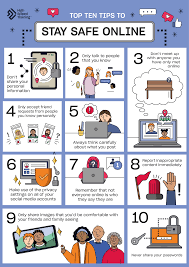
Never share your home address, school name, phone number, or location.
Be careful with photos—avoid posting pictures that give away personal details in the background.
Don’t overshare your daily routine. You never know who might be watching.
5. Recognize and Avoid Phishing Scams
Phishing is when someone pretends to be a trusted source—like your school, a friend, or a popular brand—to trick you into clicking a link or giving away your personal information.
Spot the Signs:
The message feels urgent or threatening (“Act now or your account will be closed!”).
It contains weird spelling or grammar mistakes.
It asks you to click a link or download an attachment.
It comes from a strange or unfamiliar email address.
When in doubt, don’t click. Double-check with the real person or organization before responding.
6. Keep Your Devices Updated
Software updates aren’t just about new features—they often include important security fixes. If you skip updates, your device might be open to hackers or viruses.
What to Update:
Operating systems (iOS, Android, Windows, etc.)
Browsers (Chrome, Safari, Firefox)
Apps and games
Antivirus software
Turn on automatic updates whenever possible to make sure you’re always protected.
7. Stay Safe on Public Wi-Fi
Free Wi-Fi in places like cafes, malls, or airports can be dangerous. Hackers often use these networks to spy on your activity or steal your information.
How to Protect Yourself:
Avoid logging into bank or important accounts on public Wi-Fi.
Use a VPN (Virtual Private Network) to encrypt your connection.
Turn off sharing settings on your device when in public.
8. Be Careful with What You Download
Not everything online is safe to download. Some files or apps may contain malware, which can steal your data or damage your device.
Safe Downloading Tips:
Only download apps from official stores like the App Store or Google Play.
Avoid clicking on pop-ups offering “free” items or suspicious giveaways.
Check reviews and permissions before installing anything.
9. Stay Safe While Gaming Online
Online games are a favorite pastime for many teens, but they can also be risky.
Safety Tips for Gamers:
Don’t share personal information with strangers in-game.
Use a nickname that doesn’t reveal your real name.
Report players who are abusive or inappropriate.
Be cautious with in-game purchases or third-party add-ons.
10. Use Security Software
Antivirus software and firewalls add an extra layer of defense against cyber threats. Even mobile phones can benefit from security apps.
Look for trusted antivirus programs and keep them updated regularly. They can block harmful sites, detect viruses, and even protect your passwords.
11. Learn to Spot Fake News and Misinformation
Not everything you see online is true. Fake news spreads quickly, especially on social media, and can cause confusion or even harm.
How to Check Information:
Look for multiple reliable sources.
Check the date of the article.
Be skeptical of shocking headlines or unverified claims.
Use fact-checking websites like Snopes or FactCheck.org.
12. Back Up Your Files
Imagine losing all your schoolwork, photos, or notes due to a virus or hacked account. Backups are your safety net.
Use cloud storage (like Google Drive or OneDrive) or an external hard drive to keep copies of your important files. Schedule regular backups so you never lose your data.
13. Don’t Talk to Strangers Online
This might sound like advice from your parents, but it’s still relevant. People online can pretend to be someone they’re not. Some may even try to build trust before doing something harmful.
If someone you don’t know tries to talk to you—especially in a personal or creepy way—don’t respond. Block and report them.
14. Report Anything Suspicious
If you experience online harassment, hacking, or anything that feels wrong—speak up. You’re not alone, and you don’t have to deal with it by yourself.
Who to Tell:
A trusted adult (parent, teacher, counselor)
Your school’s IT department
The platform’s support team (Facebook, Instagram, etc.)
Reporting helps stop cyberbullying and protects others too.
15. Stay Informed and Keep Learning
Cyber threats change over time, so it’s important to keep your knowledge up to date. Learn about new risks, apps, and safe online habits.
At Study Rhino, we’re here to help you stay informed with guides, tips, and tools for the digital world. Being cyber smart isn’t just about avoiding danger—it’s about using technology with confidence and responsibility.
Final Thoughts: Stay Sharp, Stay Safe
Being online is a huge part of teen life, but that doesn’t mean it has to be risky. By following simple habits and staying aware, you can enjoy the internet without putting your privacy or safety on the line.
Remember these golden rules:
Protect your passwords
Think before you share
Be cautious with strangers
Update and back up your devices
Speak up if something feels off
Your digital life should be fun, creative, and secure. Stay smart, and help your friends learn to stay safe too. Because when you know better—you browse better!