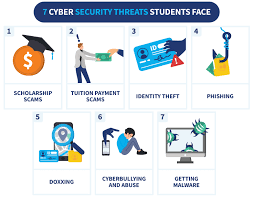

In today’s digital age, students are increasingly relying on technology for studying, communication, and entertainment. While technology provides tremendous benefits, it also exposes students to a variety of cybersecurity risks. From hacking and phishing attacks to identity theft and malware, the threats are real and can have severe consequences. As a student, protecting your online presence and personal information is crucial.
Here are some practical cybersecurity tips every student should follow to stay safe in the digital world.
1. Use Strong and Unique Passwords
One of the most important cybersecurity practices is using strong, unique passwords. Avoid using easily guessable passwords such as “123456” or your name. A strong password should be long (at least 12 characters) and include a mix of uppercase letters, lowercase letters, numbers, and symbols.
It’s also essential to use different passwords for different accounts. Using the same password for multiple accounts makes it easier for hackers to gain access to all your sensitive information if they manage to crack one of your passwords.
2. Enable Two-Factor Authentication (2FA)
Two-factor authentication (2FA) adds an extra layer of protection to your online accounts. With 2FA, you not only need your password to log in but also a second form of verification, such as a text message or authentication app code.
Many online platforms, including Google, Facebook, and even your school’s online portal, offer 2FA. Enabling it significantly reduces the risk of unauthorized access to your accounts, even if your password is compromised.
3. Avoid Public Wi-Fi for Sensitive Activities
Public Wi-Fi networks, such as those found in cafes, libraries, or airports, are convenient but can be dangerous. Hackers often use these networks to intercept unencrypted data. When you use public Wi-Fi, your personal information, like login credentials, financial details, or academic records, can be easily accessed by cybercriminals.
If you must use public Wi-Fi, avoid logging into sensitive accounts or making financial transactions. If you can’t avoid it, consider using a Virtual Private Network (VPN) to encrypt your internet connection and protect your privacy.
4. Be Wary of Phishing Attacks
Phishing is one of the most common forms of cyberattack, and students are frequent targets. Phishing involves attackers impersonating legitimate organizations, such as your school, bank, or social media platforms, to steal sensitive information like passwords or financial details.
Phishing attacks often come in the form of emails, text messages, or pop-up ads that seem to be from reputable sources. These messages typically ask you to click on a link or open an attachment. Once you do, malware is installed, or your personal information is stolen.
To avoid falling victim to phishing attacks, always double-check the sender’s email address or phone number, be cautious of unexpected messages, and never click on suspicious links. If in doubt, visit the website directly by typing its URL into your browser.
5. Keep Software and Devices Up-to-Date
Software updates are essential for cybersecurity. Developers regularly release updates to fix bugs and patch vulnerabilities that could be exploited by hackers. Whether it’s your operating system, web browser, antivirus software, or any other app, always ensure you install updates as soon as they are available.
Many devices allow you to enable automatic updates, which ensures your system is always up to date without you having to worry about it.
6. Use Antivirus Software
Even with all the precautions in place, it’s still possible to encounter malware or viruses. Antivirus software is designed to detect and remove malicious software from your devices. It can also protect you from harmful websites and email attachments.
While some operating systems, like Windows, come with built-in antivirus protection, you may want to invest in a premium antivirus solution for added security. Popular antivirus programs include McAfee, Norton, and Bitdefender.
7. Be Careful with Social Media
Social media is a great way to stay connected, but it also opens the door to potential security risks. Oversharing personal information, such as your location, school, schedule, or details about your personal life, can make you a target for cybercriminals.
Review your privacy settings on social media platforms and adjust them to limit who can see your posts and personal information. Be selective about who you accept as friends or followers and avoid sharing sensitive details in public posts.
Additionally, be cautious of suspicious friend requests or messages from people you don’t know. Cybercriminals often use fake profiles to gather personal information or spread malware.
8. Backup Your Data Regularly
Data loss can occur due to various reasons, including device failure, hacking, or accidental deletion. To avoid losing important files, it’s vital to back up your data regularly.
Use cloud storage services like Google Drive, Dropbox, or OneDrive to store copies of your important documents, assignments, and photos. You can also use external hard drives or USB flash drives for additional backups. By doing so, you ensure that even if your device is compromised or damaged, you can still access your valuable data.
9. Be Careful with Downloading Files and Apps
Downloading files or apps from unreliable sources is a common way for malware to enter your device. Always ensure that you download software only from trusted sources, such as official app stores (Google Play, Apple App Store) or well-known websites.
Before downloading any app or file, read reviews and check the permissions it requests. If an app asks for access to information or features that are unnecessary for its functionality (such as asking for camera access when it doesn’t need it), it may be suspicious.
10. Secure Your Devices with a Password or PIN
Locking your devices with a password or PIN adds an extra layer of security, preventing unauthorized access to your personal information if your device is lost or stolen. For mobile devices, use biometric authentication like fingerprints or facial recognition for added protection.
Ensure that your devices—whether they’re smartphones, laptops, or tablets—are secured with a strong password or PIN. Avoid using easily guessable codes like “1234” or “0000.”
11. Avoid Clicking on Suspicious Ads or Pop-ups
Malicious ads and pop-ups can infect your device with malware if clicked. These ads often appear on websites you visit and may offer deals or tempt you to download something. Some of them are designed to look like legitimate notifications or offer enticing offers, but they are traps to get you to click on them.
Use ad-blocking software to reduce the number of pop-ups and ads you encounter while browsing. If you do click on an ad or pop-up, be sure to check the legitimacy of the website and avoid downloading any files or entering sensitive information.
12. Educate Yourself About Cybersecurity
Staying safe online requires ongoing learning and awareness. As technology evolves, so do the threats. Stay informed about the latest cybersecurity threats and best practices by reading articles, attending workshops, and taking online courses related to cybersecurity.
Many universities and institutions offer free or low-cost resources for students to learn more about online safety. Take advantage of these resources to boost your knowledge and stay one step ahead of cybercriminals.
Conclusion
Cybersecurity is an essential aspect of student life in the digital age. With the increasing use of technology for academic and personal purposes, students must be vigilant about protecting their online information. By following these cybersecurity tips—using strong passwords, enabling 2FA, avoiding public Wi-Fi for sensitive tasks, and staying informed about cyber threats—you can significantly reduce the risks associated with digital life and focus on what truly matters: your studies and personal growth. Remember, cyber safety is not just a one-time task, but a continuous effort to protect your digital identity and data. Stay safe and stay smart online!