

By Study Rhino
In the 21st century, technology has become an essential part of our daily lives—and education is no exception. From interactive whiteboards and online assessments to virtual classrooms and educational apps, technology is transforming the traditional classroom experience in ways that were once unimaginable. For both educators and students, embracing these tools can lead to more engaging, personalized, and effective learning experiences.
This article explores how technology is being used in the classroom, its benefits, challenges, and the best practices for educators to make the most of it.
1. Why Technology in the Classroom Matters
Technology is no longer just an optional supplement to education; it’s becoming a fundamental part of how students learn. Today’s students are digital natives—they have grown up with smartphones, tablets, and the internet. Integrating these familiar tools into the classroom makes learning more relevant and engaging.
Moreover, technology supports different learning styles, enables access to vast resources, encourages collaboration, and helps prepare students for a tech-driven world.
2. Tools and Technologies Commonly Used
Let’s take a look at some of the most commonly used technologies in modern classrooms:
a. Interactive Whiteboards
These digital boards allow teachers to display and interact with content, including videos, images, and live annotations. They can turn a passive lecture into an engaging visual experience.
b. Learning Management Systems (LMS)
Platforms like Google Classroom, Moodle, and Canvas allow teachers to assign homework, post grades, and communicate with students. LMS tools centralize learning resources and make classroom management more efficient.
c. Tablets and Laptops
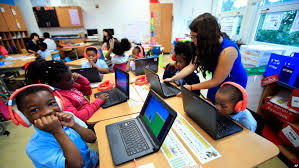
Many schools now offer 1:1 device programs, giving each student a tablet or laptop. These devices give students access to eBooks, educational apps, and research tools.
d. Educational Apps
Apps like Khan Academy, Duolingo, and Quizlet cater to various subjects and age groups. They are often interactive and gamified, making learning fun and self-paced.
e. Online Collaboration Tools
Tools like Google Docs, Padlet, and Microsoft Teams help students work together on projects, even remotely. These tools foster collaboration, critical thinking, and communication skills.
f. Virtual and Augmented Reality (VR/AR)
VR and AR can bring abstract concepts to life. For example, a biology student can explore the human heart in 3D or take a virtual tour of the solar system.
g. Video Conferencing Platforms
Zoom and Microsoft Teams have made remote and hybrid learning possible. These platforms are also used for guest lectures and virtual field trips.
3. Benefits of Using Technology in the Classroom
a. Personalized Learning
Technology enables educators to tailor instruction based on individual student needs. Programs can adapt to a student’s pace, helping struggling learners and challenging advanced ones.
b. Increased Engagement
Interactive tools make lessons more engaging. Students are more likely to participate and retain information when visuals, games, or simulations are involved.
c. Instant Feedback
Online quizzes and assessments can provide instant results, helping students learn from their mistakes and enabling teachers to track progress in real time.
d. Collaboration and Communication
Tech tools encourage group work and discussion, even across distances. Students learn to work as a team, share ideas, and communicate effectively.
e. Access to Global Resources
With the internet, students can access information from around the world. This broadens their perspective and encourages independent research.
f. Preparation for the Future
Tech literacy is crucial in today’s job market. Introducing technology early helps students build essential digital skills for higher education and careers.
4. Challenges of Integrating Technology
Despite its advantages, using technology in the classroom does come with challenges:
a. Digital Divide
Not all students have equal access to technology. Socio-economic disparities can lead to unequal learning opportunities.
b. Distractions
Without proper monitoring, students may use devices for non-educational purposes like games or social media.
c. Teacher Training
Not all educators are tech-savvy. Teachers need adequate training to use technology effectively and confidently.
d. Cost and Maintenance
Devices and software require funding, regular updates, and technical support, which may strain school budgets.
e. Cybersecurity and Privacy
With more data being stored and shared online, schools must ensure student privacy and protect against cyber threats.
5. Best Practices for Using Technology in the Classroom
To make the most of technology, educators should follow certain best practices:
a. Start with Clear Objectives
Technology should support educational goals, not replace them. Teachers should choose tools that align with curriculum objectives.
b. Blend Traditional and Digital Methods
The best classrooms use a combination of face-to-face instruction and digital tools. Blended learning helps cater to all learning styles.
c. Provide Training and Support
Ongoing professional development is essential. Schools should invest in training for teachers and provide technical support.
d. Encourage Responsible Use
Set clear guidelines for device use. Teach students about digital citizenship, online safety, and ethical use of information.
e. Monitor Progress
Use analytics and feedback tools to track student performance. This helps in identifying areas where students need extra help.
f. Keep It Inclusive
Ensure all students have access to technology. Consider assistive technologies for students with special needs.
6. Real-World Examples of Technology Integration
a. Flipped Classrooms
In this model, students watch lectures at home (via video) and do “homework” in class with the teacher’s support. This approach encourages active learning and peer interaction.
b. Gamification
Schools are incorporating game-based learning platforms like Kahoot! and Minecraft Education Edition. These tools make learning competitive and fun while reinforcing core concepts.
c. Coding and Robotics
Many schools now teach basic coding and robotics from an early age using platforms like Scratch, LEGO Mindstorms, and Arduino kits. These activities develop problem-solving and creativity.
d. Virtual Labs
Science classes can use virtual lab simulations when real labs are not available. This provides safe, cost-effective ways to conduct experiments.
7. The Role of Teachers in a Tech-Enabled Classroom
Technology can never replace the teacher. Instead, it changes the teacher’s role from information provider to learning facilitator. Educators guide students in navigating digital tools, critically analyzing content, and applying knowledge.
Teachers also play a vital role in ensuring that students use technology ethically and productively. They must balance the benefits of tech with the human aspects of teaching—empathy, encouragement, and mentorship.
8. The Future of Technology in Education
The future promises even greater integration of technology in learning environments. Here are a few trends to watch:
a. Artificial Intelligence (AI)
AI can help personalize learning paths, grade assignments, and offer insights into student behavior.
b. Learning Analytics
Big data can help schools and teachers identify learning gaps, adapt instruction, and improve outcomes.
c. Augmented Learning
AR tools will continue to enrich lessons, offering immersive learning experiences in science, history, art, and more.
d. Blockchain Credentials
Blockchain may be used to issue secure and verifiable academic records and certifications.
e. Lifelong Learning Platforms
Education won’t be limited to schools. Platforms like Coursera and edX show that learning is becoming more flexible and continuous.
Conclusion
Technology in the classroom is no longer a luxury—it’s a necessity. When used thoughtfully, it enhances learning, increases engagement, and prepares students for a rapidly evolving world. However, it also comes with challenges that must be addressed through smart policies, training, and inclusive practices.
Educators, students, and policymakers must work together to harness the power of technology while keeping the heart of education—curiosity, creativity, and connection—alive.
At Study Rhino, we believe in the intelligent integration of technology to create classrooms that are not just smart, but also human-centered. Let’s embrace innovation while remembering that the best learning happens when minds and hearts connect.
Would you like a version of this article with visuals, a PDF download, or split into a blog series for Study Rhino?